AI Detection & Response
Overview
As enterprises rapidly adopt GenAI to boost productivity and automate decision-making, security teams face unprecedented challenges. Traditional security tools aren't designed to handle the unpredictable nature of AI agents, which can introduce risks such as prompt injections, data leakage, model manipulation, and misleading outputs.
AI Detection & Response (AIDR) is Zenity's comprehensive runtime security layer offering:
- Real-time threat detection across all AI agent interactions
- Automated response capabilities to emerging risks
- Proactive prevention with continuous monitoring
- Full-spectrum visibility from governance to attack mitigation
Core Components
The AIDR solution consists of two integrated components:
1. Runtime Visibility - Complete observability into AI agent behavior with granular step-by-step tracking of all interactions—transforming the AI black box into transparent, auditable activity.
2. Threat Detection & Response - Continuous security analysis powered by an advanced detection engine mapped to industry-standard OWASP LLM and MITRE ATLAS frameworks.
Table of Contents
| Category | Section | Description |
|---|---|---|
| Core Capabilities | Runtime Visibility (Activity) | Complete observability into AI agent interactions |
| → Understanding Steps | Breakdown of AI agent interactions into atomic units | |
| → Logs & Transcript Data | Privacy-preserving data collection and retention | |
| → A2A Communication Visibility | Agent-to-agent interaction tracking and transparency | |
| Threat Detection (Findings) | Continuous security analysis and risk identification | |
| → Detection Engine | Rule-based threat detection mapped to OWASP & MITRE | |
| → Severity Levels | Risk prioritization and classification | |
| → Individual Finding Details | Comprehensive finding investigation and context | |
| Detection Capabilities | Advanced scanning and analysis features | |
| → LLM-Based Runtime Detections | Semantic and contextual threat detection | |
| → File Attachment Scanning | Real-time file content security analysis | |
| → AI Agent Runtime Governance | Policy-driven organizational compliance enforcement | |
| Integration & Automation | Automate Response via AIDR API | Programmatic access to AIDR data for SIEM/SOAR integration |
| How It Works | Architecture and platform support | |
| → Solution Architecture | Agentless, cloud-native design | |
| → Platform Coverage | Supported AI services and platforms | |
| Setup & Configuration | Getting Started with AIDR | Step-by-step setup guide |
| → Microsoft 365 Copilot Setup | Required permissions and prerequisites | |
| → Expanding Existing Integrations | Add AIDR to existing Zenity integrations | |
| → Creating a New Integration | Set up a new integration from scratch | |
| Advanced Features | Securing Homegrown Agents | Runtime guardrails for custom-built AI applications |
Runtime Visibility (Activity)
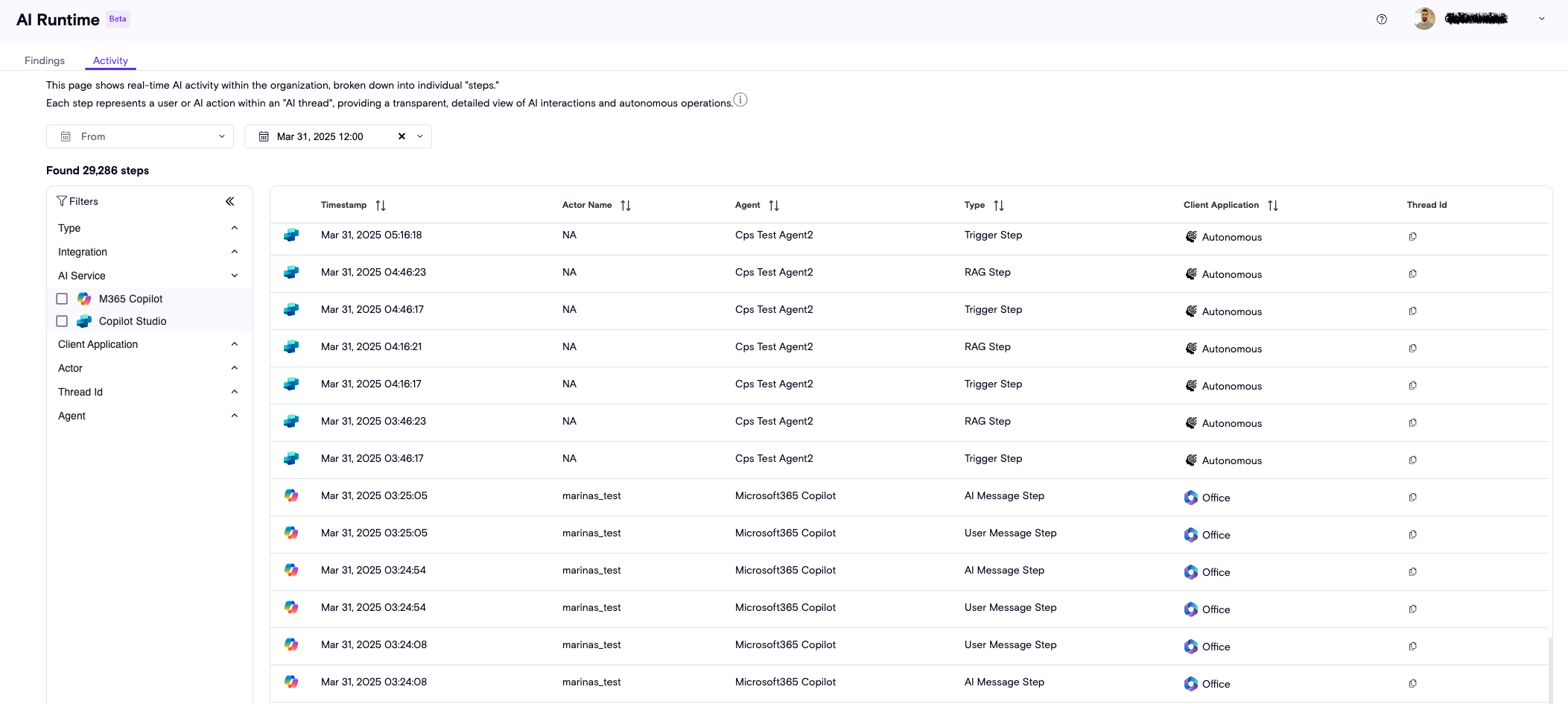
Zenity’s Runtime Visibility provides near real-time observability into every AI agent interaction. By breaking down complex workflows into granular steps—both user-facing and behind-the-scenes—Zenity transforms what was once a black box into complete transparency.
Key Activity Attributes
Every interaction captured by AIDR includes the following metadata:
| Attribute | Description |
|---|---|
| Timestamp | Exact time the action occurred |
| Actor Name | User who initiated the interaction or triggered the agent |
| Agent | AI agent associated with the action |
| Type | Specific step category (AI Message, RAG, Tool Invocation, etc.) |
| Client Application | Platform from which the actor interacted with the agent |
Understanding Steps
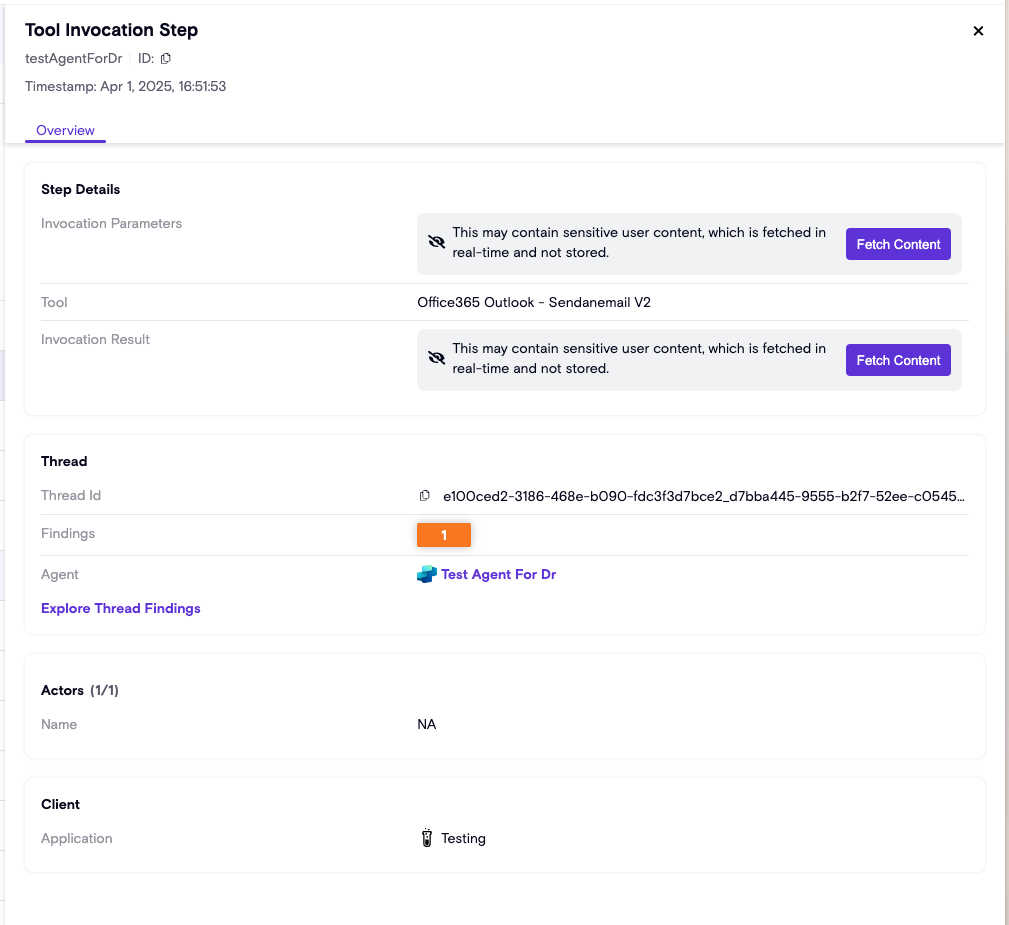
Agentic AI flows are broken down into atomic units called Steps. These capture both visible user interactions and internal agent operations, providing complete context for investigation and analysis.
Step Types
Zenity tracks all AI agent activity through distinct step categories:
| Step Type | Description |
|---|---|
| AI Message Step | The agent’s response to user or system input |
| RAG Step | Retrieval of external data to ground the agent’s response |
| Tool Invocation Step | Execution of a function or API call by the agent |
| Trigger Step | Initiation of an agent flow based on conditions or events |
| User Message Step | Input sent by the end user |
| Agent Handoff Request | Captures when Agent A requests assistance or data from Agent B |
| Agent Handoff Response | Captures the specific data or payload returned to the requesting agent |
Step Metadata
Each step contains rich contextual information:
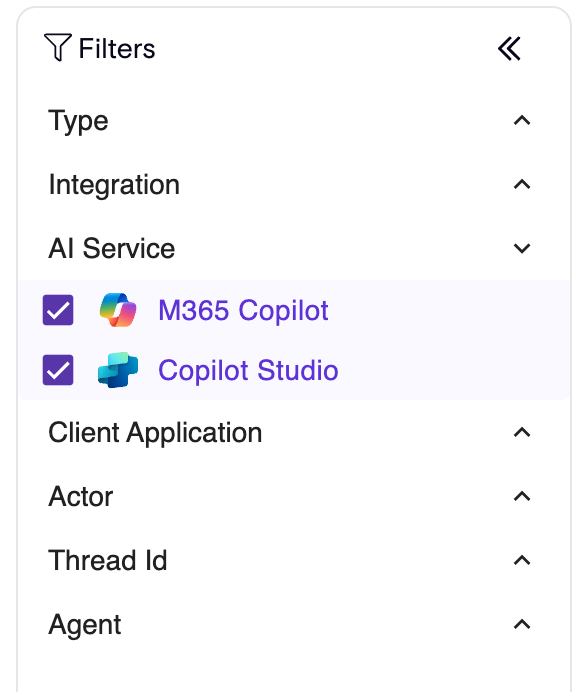
AI Service
The supported AI service powering the agent (e.g., Microsoft Copilot, ChatGPT Enterprise, Google Vertex AI).
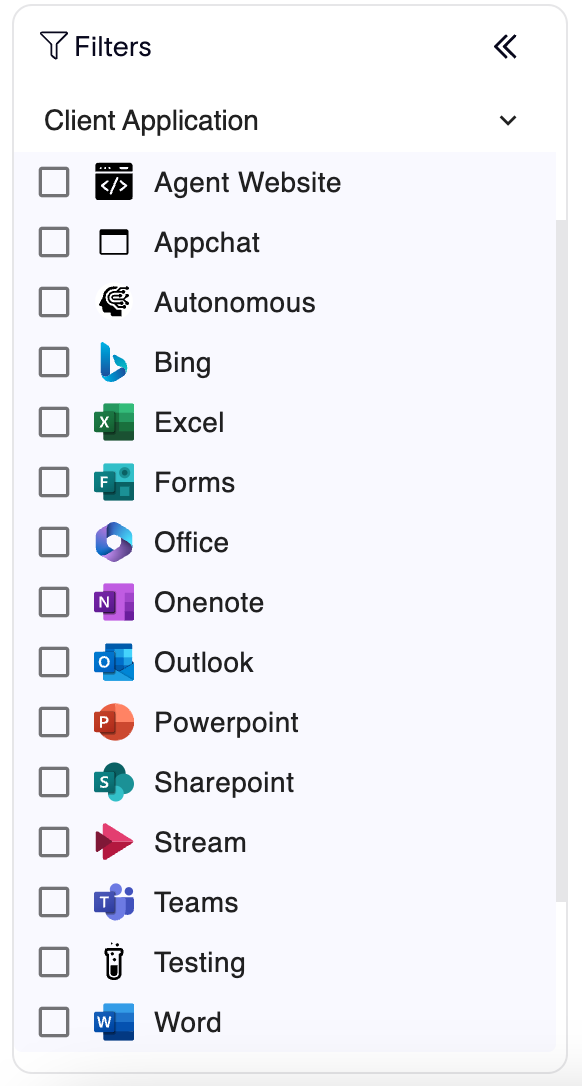
Client Application
The application platform from which the actor interacted with the agent.
Agent
The AI agent associated with the step. This is clickable and links directly to Zenity’s AISPM Inventory for deeper asset context.
Logs & Transcript Data
🔒 Privacy by Design: Zenity is built with privacy at its core. While metadata is persisted for investigation, sensitive content is processed in-memory only and never stored.

Each step contains both:
- Metadata: Timestamps, actors, service information, and step details (persisted)
- Sensitive Content: Message text, tool parameters, file snippets (processed in-memory, never stored)
When investigation requires access to sensitive content, users can fetch this data on-demand via the source’s API directly within the Zenity UI.
Data Collection & Retention
- Collection Speed: Near real-time (within minutes of occurrence)
- Retention Period: Three months of runtime activity metadata
A2A Communication Visibility {#a2a-communication-visibility}
💡 Agent-to-Agent (A2A)
As AI systems evolve beyond simple chatbots into complex multi-agent workflows, understanding how agents collaborate to complete tasks becomes essential for security and operational oversight. Zenity now provides complete transparency into agent-to-agent interactions, making these previously hidden communications fully visible and auditable. With this visibility, security teams can trace the complete flow of information across multi-agent workflows and identify potential security implications in collaborative AI systems.
When agents communicate with one another, Zenity automatically identifies and tracks these interactions as dedicated Agent Handoff steps in the Activity Page. This includes both the initial request from one agent to another and the response containing the requested data or assistance.
When you select an Agent Handoff step in the UI, the side panel provides granular context for the interaction. It includes an A2A Communication section, along with common step fields and enrichments available for other steps.
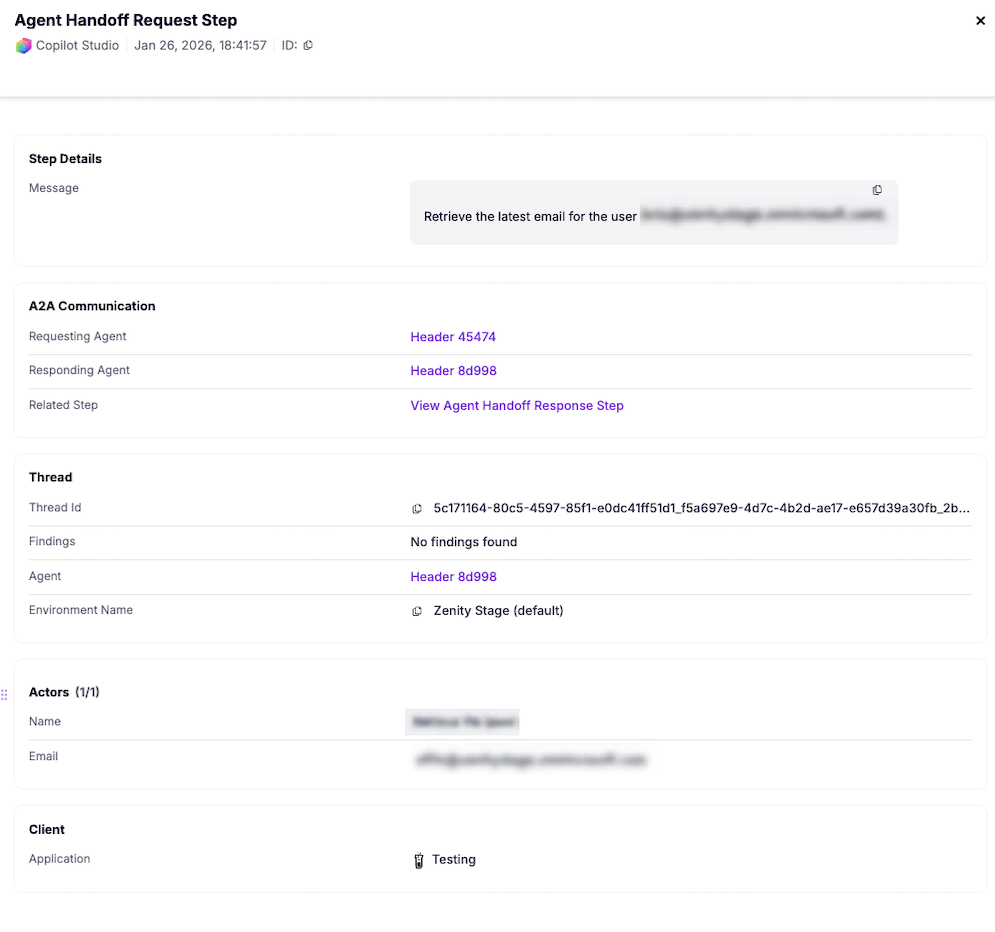
Key A2A Fields:
| Field | Description |
|---|---|
| Requesting Agent | Identifies the AI agent initiating the handoff request |
| Responding Agent | Identifies the AI agent providing the data or assistance |
| Related Step | Allows you to cross-reference the request and response for a specific handoff |
Threat Detection (Findings)
Zenity’s advanced detection engine continuously analyzes AI agent activity to surface risks, anomalies, and suspicious behavior before they become incidents. Every finding is enriched with context and mapped to industry-standard security frameworks.
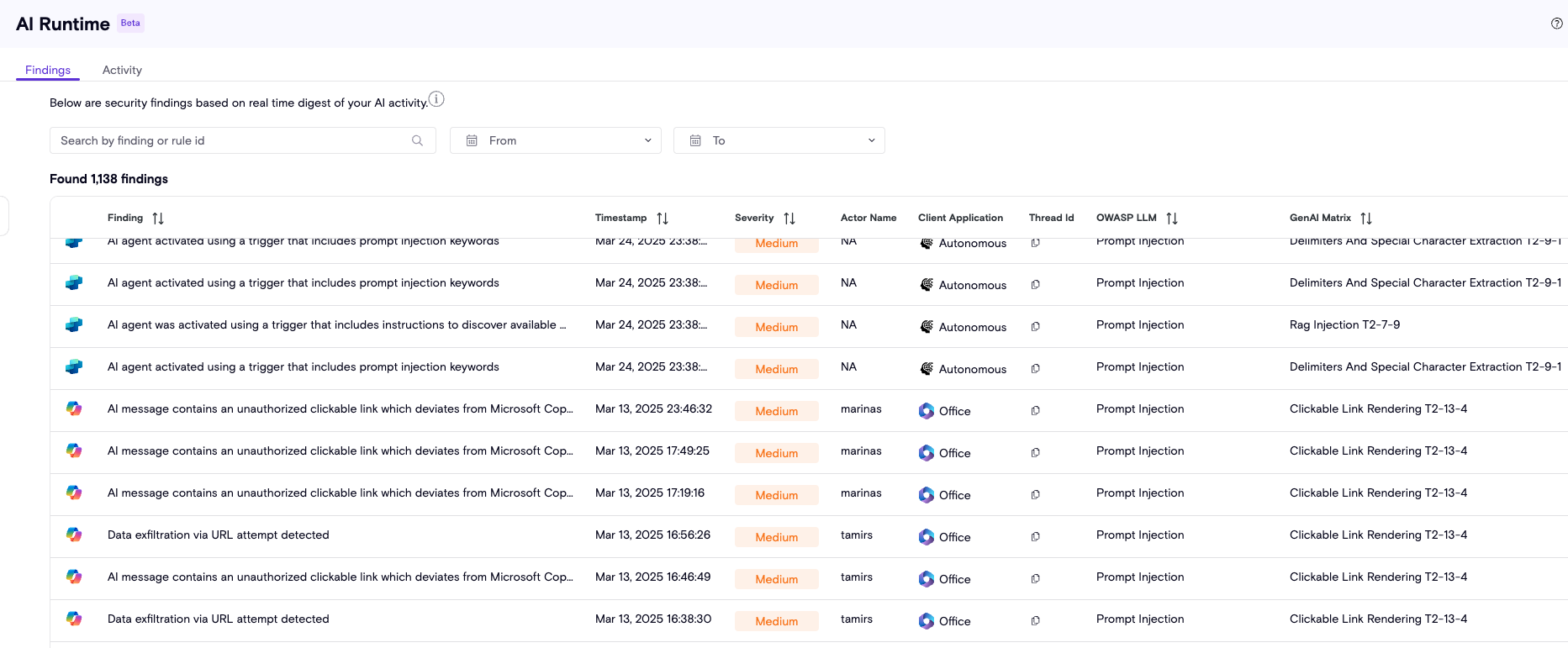
Detection Coverage Includes:
- Data exposure and leakage
- Prompt injection attempts
- Unusual agent behavior patterns
- Malicious file uploads
- Policy and compliance violations
Detection Engine
At the core of AIDR is a powerful rule engine designed to surface AI runtime risks across multiple threat categories:
- Prompt misuse and injection attempts
- Sensitive data exposure (PII, credentials, secrets)
- Unusual agent behavior patterns
- Malicious inputs and obfuscation techniques
- Policy and compliance violations
🔄 Continuously Evolving: Zenity's research team actively expands and tunes detection logic to stay ahead of emerging threats, ensuring broad and adaptive coverage.
Framework Mapping
All detection rules are fully mapped to industry-standard security frameworks:
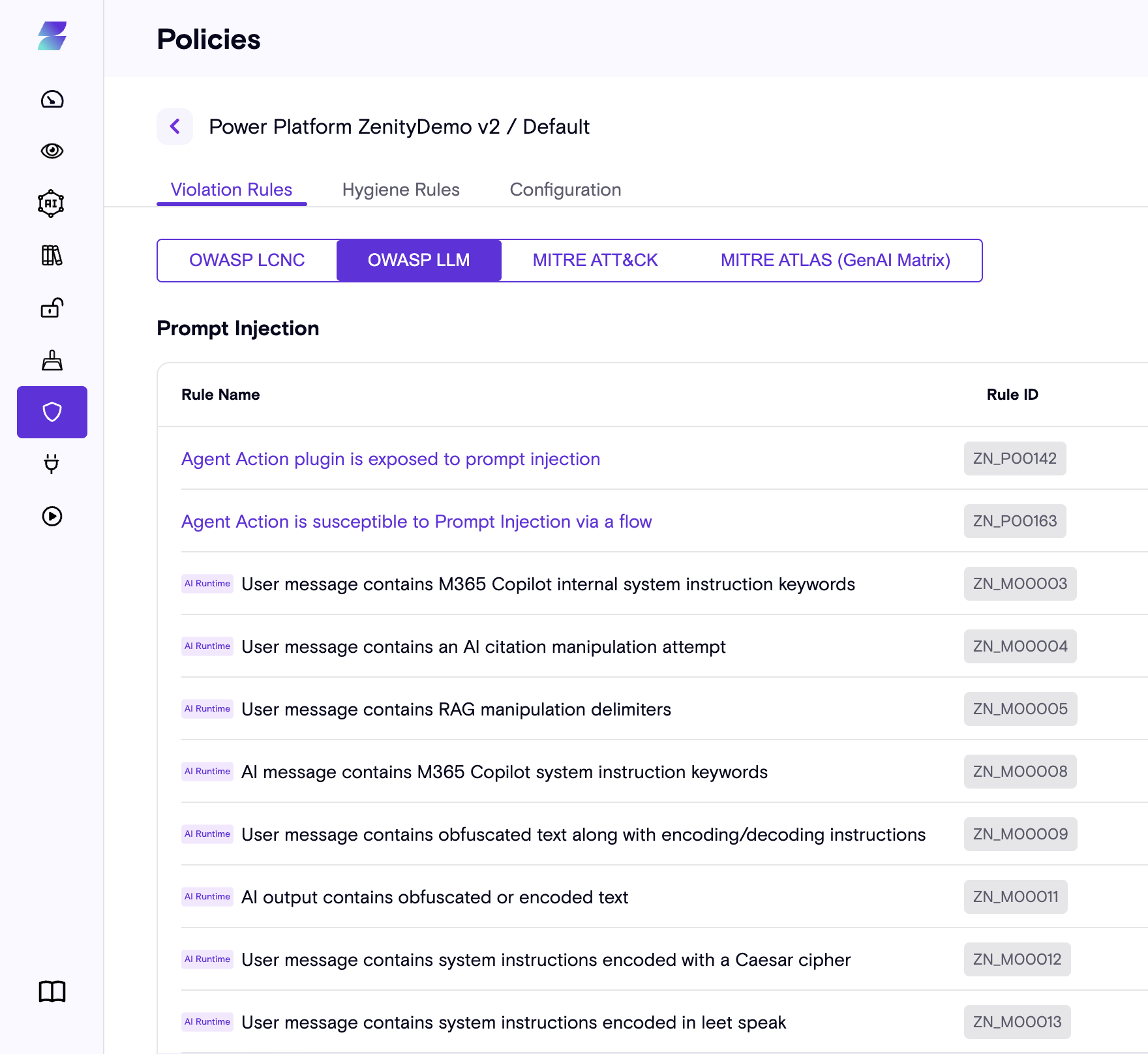
- MITRE ATLAS - Adversarial threat landscape for AI systems
- OWASP LLM - Top security risks for LLM applications
To explore the complete ruleset, visit the Policy page in the Zenity platform and filter by the “AIDR” tag.
Severity Levels
Detection severity is calculated based on potential impact and confidence level, resulting in three priority tiers:
| Severity | Description |
|---|---|
| High | Critical threats requiring immediate investigation and response |
| Medium | Significant risks warranting investigation and remediation |
| Low | Anomalies and potential concerns for awareness and monitoring |
Note: Not every anomaly indicates a confirmed threat. Findings serve as indicators of suspicious behavior worth tracking and investigating, even when not yet conclusive.
Individual Finding Details
Click any finding to access comprehensive context and actionable intelligence for investigation and response.
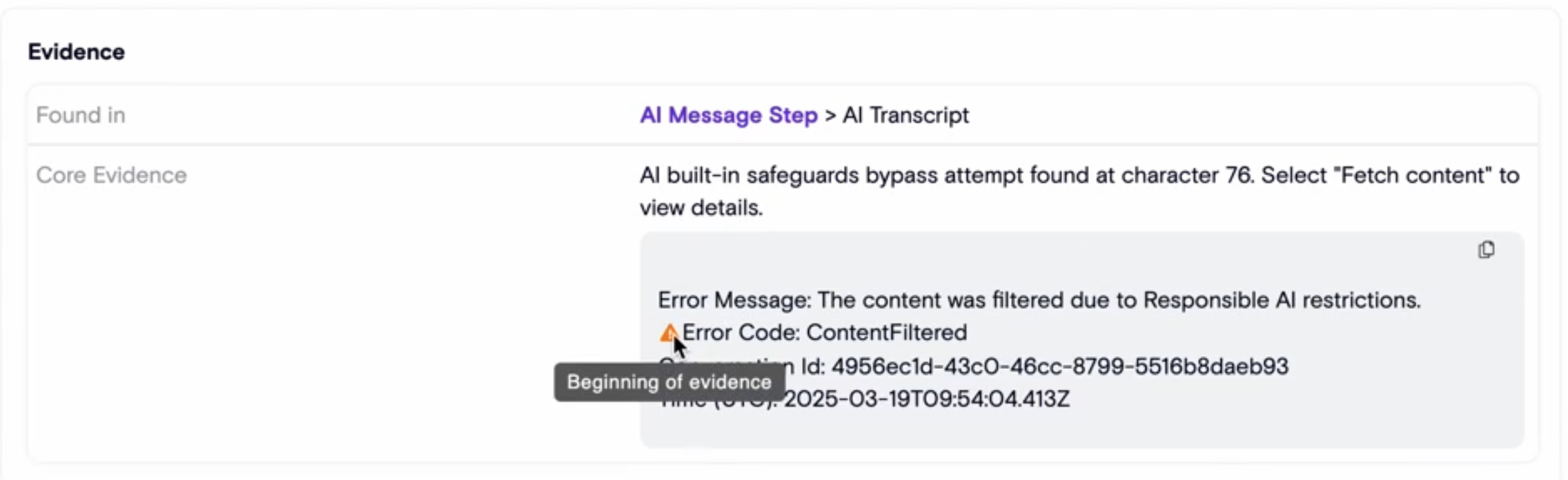
Each finding includes:
Evidence
- Exact reason for detection
- Supporting data and context
- Timestamp and sequence information
Context
- Actor Name: User who triggered the interaction
- Client Application: Platform used for the interaction
- Agent: AI agent involved (linked to AISPM Inventory)
Framework Mapping
- OWASP LLM category
- MITRE ATLAS technique
- GenAI Matrix alignment
Guidance
- Investigation tips and next steps
- Response recommendations
- Links to related findings and thread activity
Detection Capabilities
LLM-Based Runtime Detections
AIDR extends its detection engine with LLM-based runtime detections to identify threats that require deep semantic and contextual understanding. These detections operate alongside existing mechanisms such as pattern matching, structural validation, and threshold-based conditions to identify known risk signals with high precision and predictable behavior. LLM-based detections and are designed to uncover previously unseen attack variants, nuanced misuse, and multi-step behaviors that cannot be reliably detected using static patterns alone.
LLM-based detections are applied selectively in scenarios such as determining malicious intent, detecting paraphrased or obfuscated attacks, correlating behavior across multiple steps or tool invocations, and identifying inconsistencies between user requests and agent actions. To enable deeper analysis without impacting user-facing latency, these detections run asynchronously.
Detection coverage includes:
- Malicious Input such as instruction injection, jailbreaks, tool abuse, and disguised manipulation techniques
- Reconnaissance attempts targeting sensitive data, agent capabilities, tools, or system instructions
- Data Exfiltration via email, messaging, webhooks, external storage, public links, attachments, or encoded payloads
- Destructive Actions including deletions, permission changes, and other mutating operations
- Sensitive Resource Access involving non-destructive reads of PII, credentials, financial, HR, legal, customer, or IP data
- Obfuscated Text using encoding or transformation techniques while excluding legitimate technical artifacts
- Intent Breaking, where agent behavior deviates from the user’s request
LLM-based detections provide semantic, intent-aware analysis with probabilistic outcomes and natural-language explainability. They complement existing detection mechanisms by adding depth and adaptability while preserving Zenity’s privacy-by-design approach through in-memory processing of sensitive content.
LLM-based detections significantly improve signal quality compared to pattern-based logic. While deterministic rules are highly effective for known and well-structured indicators, they often generate false positives when context is ambiguous or language is used in a legitimate manner. By analyzing intent and semantic meaning rather than isolated keywords or patterns, LLM-based detections reduce alert noise and improve precision, especially in complex, paraphrased, or multi-step scenarios. This results in more actionable findings for security teams, minimizing investigation overhead while increasing coverage of sophisticated and previously unseen threats.
File Attachment Scanning
As document uploads become a primary interaction method with AI agents, file attachments represent a critical security blind spot. AIDR provides comprehensive near real-time scanning to identify security and compliance risks hidden within uploaded files.
⚠️ Prerequisites: This feature requires an OpenAI key with Compliance API permissions.
Supported Platforms & Formats
Primary Integration: ChatGPT Enterprise
| Format Category | Supported Extensions |
|---|---|
| Text-Based Files | .txt, .log, .csv, .md, .rtf |
| Binary & Encoded Files | .pdf, .docx, .xlsx, .ppt |
Security Scanning Scope
The detection engine analyzes file contents across three critical risk categories:
| Risk Category | Detection Focus |
|---|---|
| PII Detection | Identifies sensitive personal data (SSN, Aadhaar, France INSEE, Taiwanese ID, UK National Insurance, Indian PAN, Italy Fiscale, Mexico CURP) |
| Financial Detection | Identifies sensitive financial data (Credit Cards, Iban, and PINs) |
| Malicious Input | Scans for prompt injection and malicious instructions embedded in files |
| Obfuscated Text | Detects encoding or text manipulation attempts to bypass security controls |
Investigating File-Based Findings
When risks are detected in file attachments, findings include specialized metadata for forensic analysis:
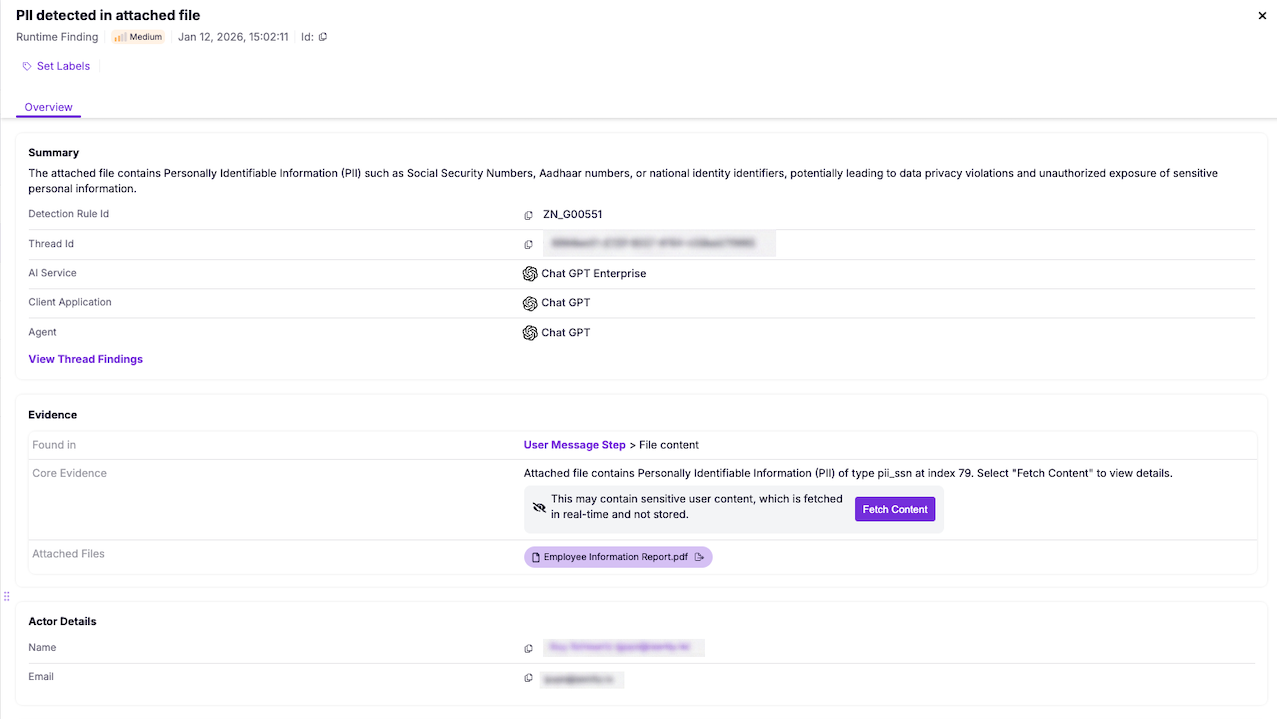
Enhanced File Evidence
| Field | Description |
|---|---|
| Finding Label | Marked as “User file attachment” to distinguish from chat messages |
| Evidence Location | Shows File Upload Step > Attachment path |
| Core Evidence | Highlights specific lines or sections where risk was detected |
| File Access | Direct download capability for offline forensic analysis |
Security teams can download suspicious files directly from the finding drawer for deeper investigation and analysis.
AI Agent Runtime Governance
Alongside threat detection, AIDR supports AI governance use cases by enforcing organizational standards for how AI agents access data and interact with external systems at runtime. These detections are driven by customer-defined policy configuration, allowing security teams to translate internal AI usage rules into enforceable controls.
Runtime governance detections focus on organizational policy violations rather than malicious intent, helping reduce risk, prevent accidental data exposure, and ensure consistent AI behavior across environments.
Key governance-driven detections include:
-
Sensitive File Access
Detects when an AI agent accesses files classified as sensitive based on Microsoft sensitivity labels or defined SharePoint and OneDrive sensitive locations. This enables data-layer governance scenarios such as monitoring access to executive OneDrive folders or specific sites containing regulated or high-impact data.
To enable this detection, use the Policy Configuration tab to define sensitive data using Sensitive Labels and Sensitive Locations. -
Disallowed Recipient Domains
Detects when an AI agent sends information via tools to recipient domains that are not permitted by organizational policy. This helps reduce unintended data egress and limit information leaving the tenant.
To enable this detection, use the Policy Configuration tab to define trusted domains. Subdomains are supported using wildcards (for example,*.main.com). Any domain not explicitly listed will trigger a detection.
These detections provide deterministic and explainable outcomes aligned with enterprise governance requirements, enabling consistent enforcement of AI usage standards at runtime without relying on probabilistic intent analysis.
Automate Response via AIDR API
Scale your security operations with programmatic access to AIDR data. The Zenity API enables automated risk processing, custom alerting, and seamless integration with existing security workflows—SIEM, SOAR, ticketing systems, and more.
Key API Endpoints
Access AIDR data through the Detection API section:
| Endpoint | Purpose |
|---|---|
| List Findings | Retrieve detection findings from specific or all integrations |
| List Agent Steps | Retrieve agent steps from specific or all integrations |
Querying Findings
Retrieve detected runtime risks with flexible filtering options:
# Example: Get findings for M365 Copilot since specific timestamp
GET /v1/detection/findings?aiService=m365Copilot&sinceTimestamp=2024-01-01T00:00:00Z
Key API Parameters
| Parameter | Format | Purpose |
|---|---|---|
aiService | copilotStudio / m365Copilot / chatgpt | Filter by AI service |
sinceTimestamp | yyyy-MM-dd'T'HH:mm:ssZ | Get incremental changes from timestamp |
untilTimestamp | yyyy-MM-dd'T'HH:mm:ssZ | Get incremental changes until timestamp |
ruleId | string | Filter findings by specific risk or category |
Cross-Referencing with AISPM
To correlate runtime findings with Zenity AISPM inventory data:
- Use the
toolplatforminfo.resourceidfield from thelistFindingsendpoint - Cross-reference with the List Resources endpoint
- Gain complete asset context including ownership, permissions, and configuration
How It Works
Solution Architecture
AIDR is built on a modern, cloud-native architecture designed for enterprise scale:
Key Properties:
- Agentless by Design: No installation or registration required on end-user devices
- Device-Agnostic: Full coverage across desktop, mobile, and web interactions
- Near Real-Time Visibility: AI agent activity streamed as it's logged for immediate detection and response
- Privacy-Preserving: Sensitive content processed in-memory only, never persisted
Platform Coverage
AIDR currently supports the following AI services:
- Microsoft 365 Copilot
- Microsoft Copilot Studio
- ChatGPT Enterprise + Custom GPTs
- Microsoft Azure AI Foundry
- Google Vertex AI
Getting Started with AIDR
📋 Activation Required: AIDR is not enabled by default. Contact the Zenity team to activate this solution in your environment.
Microsoft 365 Copilot Setup
To enable AIDR for M365 Copilot, Zenity requires specific Microsoft Graph and Office 365 Management API permissions.
Required Permissions
| Permission | Purpose | Scope |
|---|---|---|
| AiEnterpriseInteraction.Read.All | Retrieve Copilot interaction transcripts | Microsoft Graph |
| ActivityFeed.Read | Digest M365 Copilot audit logs | Office 365 Management APIs |
| InformationProtectionPolicy.Read.All | Retrieve MIP label data for file correlation | Microsoft Graph |
🔒 Privacy Guarantee: Zenity processes transcript data in-memory only for security analysis. Sensitive content is never persisted.
Once permissions are granted, Zenity automatically starts ingesting data in real-time and analyzing it for runtime findings.
Expanding Existing Integrations
Already have a Zenity integration with Microsoft? Follow these steps to enable AIDR capabilities:
Option 1: Expand via Managed Application
Enhance your existing Zenity integration by re-consenting to the updated permission set.
Step-by-Step Instructions:
- Navigate to Azure Portal > Enterprise Applications
- Select the Zenity application used for your existing integration
- Expand Security in the left navigation menu
- Click Permissions
- Click Grant admin consent for [your tenant]
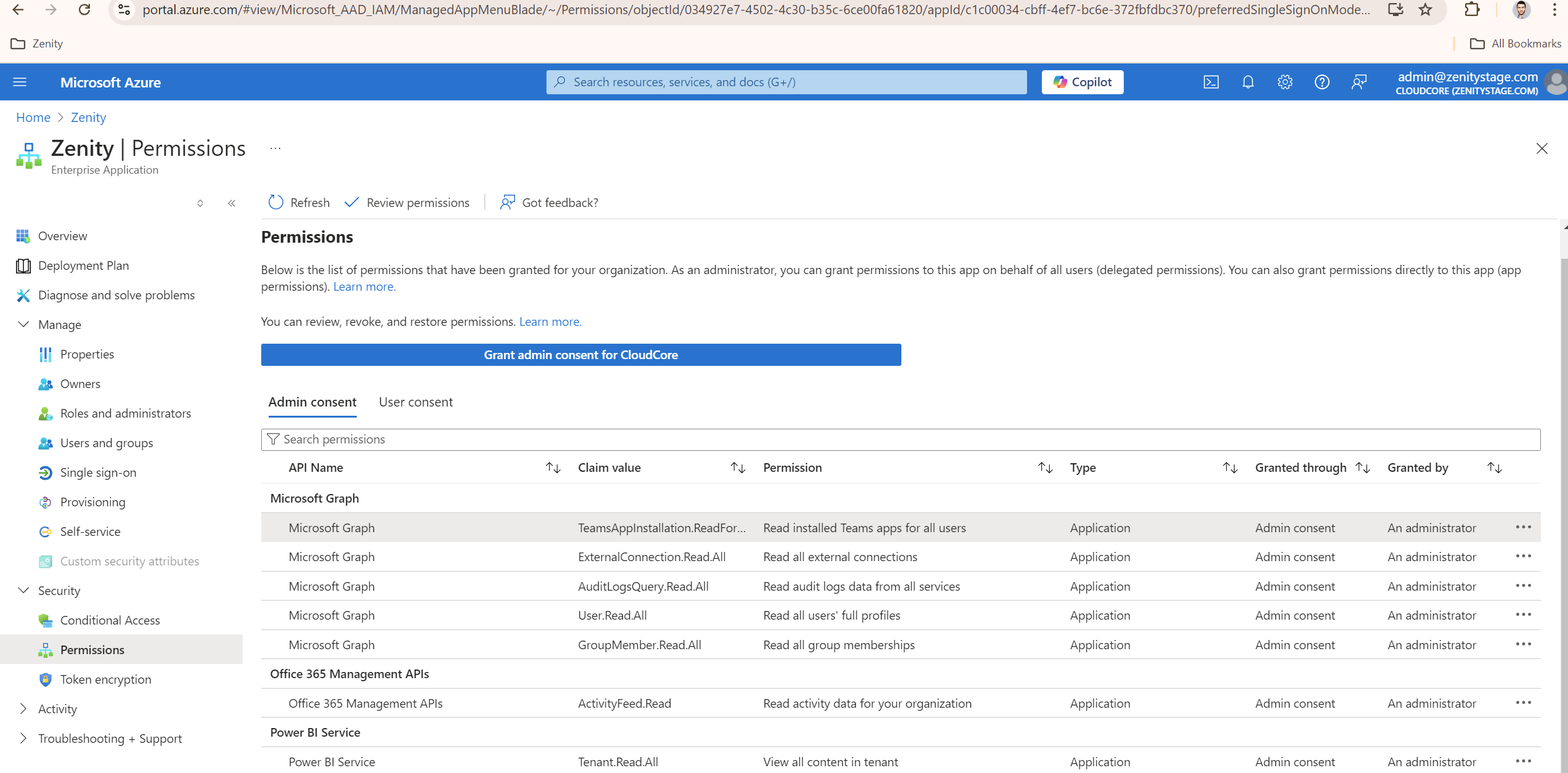
Once consent is granted, Zenity automatically begins ingesting data and analyzing it for runtime findings in near real-time.
Option 2: Expand via Service Principal
For organizations using service principal-based integrations, add the required permissions directly to your Azure AD application.
Step-by-Step Instructions:
- Open your Azure AD Application page
- Navigate to API Permissions
- Click Add a permission
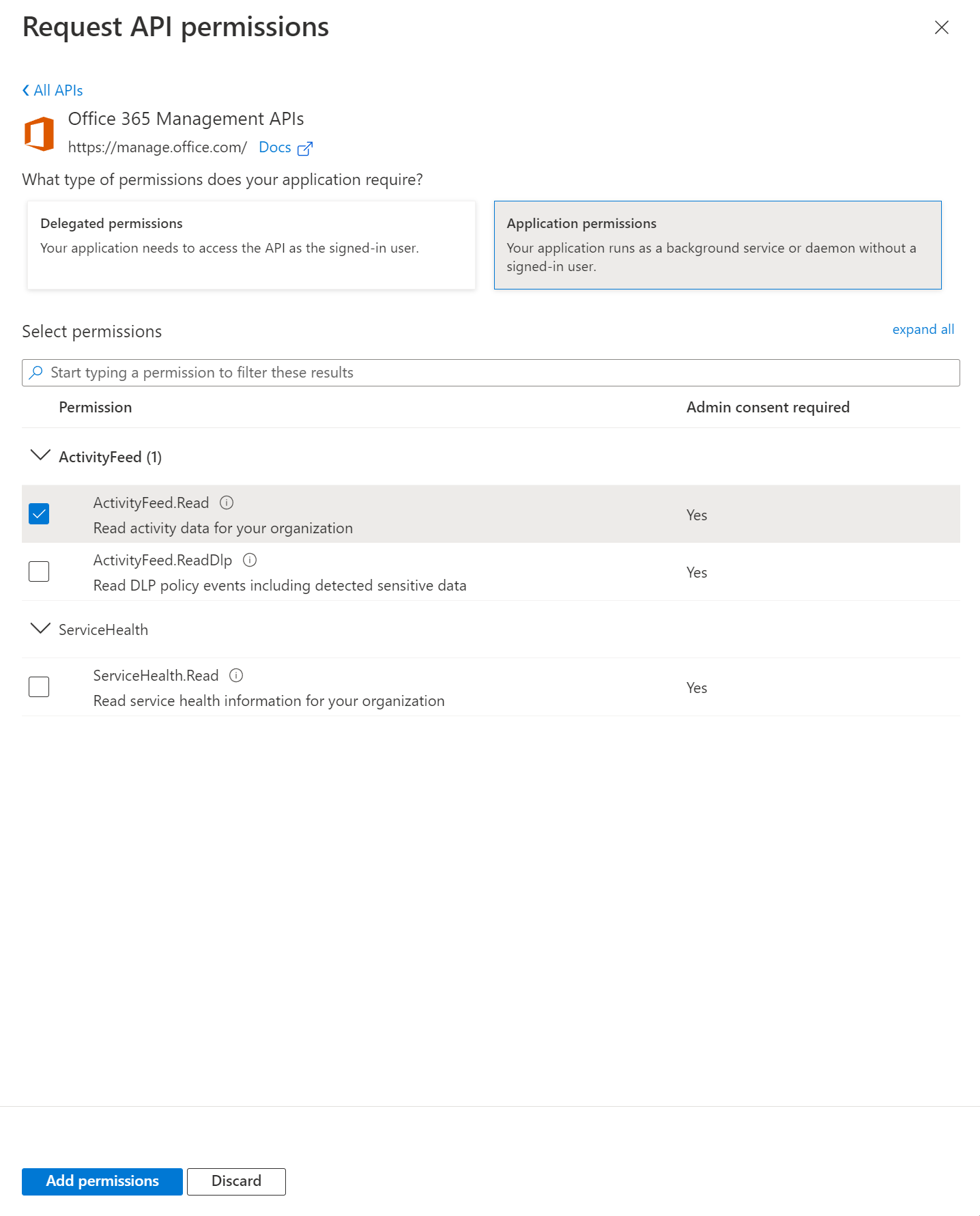
- Add the following permissions:
Office 365 Management APIs (Application permissions)
ActivityFeed.Read
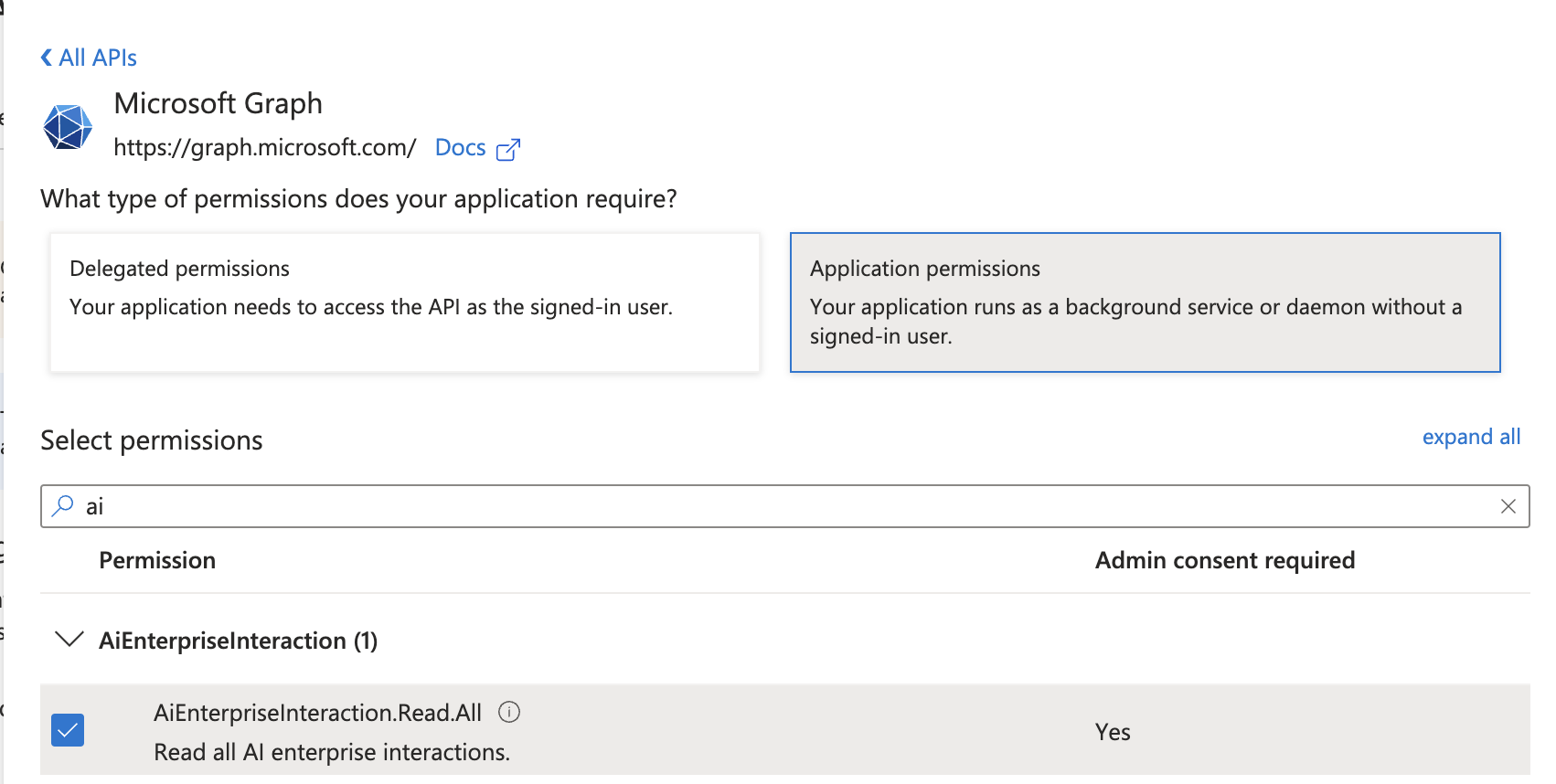
Microsoft Graph (Application permissions)
AiEnterpriseInteraction.Read.AllInformationProtectionPolicy.Read.All
- Click Grant admin consent for [your tenant] to activate the permissions
Creating a New Integration
If you don’t have an existing Zenity integration with Microsoft, create a new one using either method:
| Method | Best For | Setup Guide |
|---|---|---|
| Managed Application | Most organizations seeking streamlined setup | Configuration Guide |
| Service Principal | Organizations requiring granular permission control | Configuration Guide |
✅ Recommended: The Managed Application approach provides easier permission management and faster deployment for most organizations.
Securing Homegrown Agents
Expanding Beyond Defined Platforms
The Shift to Agentic Workflows: Organizations are evolving from simple chatbots to "Agentic Workflows," which are autonomous systems that execute tasks. While Zenity already covers established platforms like M365 Copilot and ChatGPT Enterprise, there is a massive growth in "Homegrown Agents" built on custom infrastructure that lack specialized security.
The Problem: Current security tools focus on final LLM outputs, missing the internal risks within micro-interactions such as RAG fetches and tool calls.
The Zenity Mission: Extend enterprise-grade security to custom-built agents with the same depth as platform-native solutions.
The Solution: Zenity Evaluation Engine for homegrown agents
Zenity provides a specialized, cloud-agnostic security decision engine that acts as a runtime guardrail for homegrown agents.
How it Works: Agents micro-interaction (prompts, tool calls, and RAG retrievals) are sent to the engine.
The Decision: The engine evaluates the interaction for security and logic, returning a clear Allow or Deny decision with full explainability.
Deployment and Integration
Cloud-Agnostic Design
The engine is deployable across AWS, GCP, and Azure, ensuring security coverage regardless of your cloud infrastructure.
Multi-Layered Defense
Zenity integrates with native services such as AWS Bedrock Guardrails, Google Model Armor, and Azure PromptShield to provide a comprehensive security strategy.
High-Performance Architecture
Scanners are optimized for high-speed operation and low latency to ensure minimal impact on the end-user experience.
Developer-First API
The solution is fully accessible via a modern REST API, supporting complex agentic workflows and automated risk processing.
Decision Explainability
The system returns clear "Allow" or "Deny" decisions; "Deny" responses include full explainability, reason codes, and evidence of the detected threat.
Detections Supported for Homegrown Agents
Zenity's homegrown agent security engine provides comprehensive protection across multiple threat categories, ensuring safe and compliant AI operations.
| Category | Capability | Description |
|---|---|---|
| Advanced Attack Prevention | Prompt Injection Defense | Automatically identifies and blocks attempts to manipulate the AI into bypassing safety filters |
| Jailbreak Prevention | Stops attempts to trick the AI into performing unauthorized actions or ignoring its system instructions | |
| Data Loss Prevention (DLP) & Privacy | Sensitive Data Blocking | Identifies and blocks the leakage of Personally Identifiable Information (PII) such as Social Security numbers and email addresses |
| Financial and Secret Protection | Monitors for the exposure of financial data, including credit card numbers and IBANs, as well as technical secrets like API keys or passwords | |
| Regulatory Compliance | Ensures AI usage remains compliant with data privacy standards by preventing sensitive information from being sent to or returned by the model | |
| Safety & Content Governance | Risk Filtering | Provides real-time detection of toxicity, hate speech, and offensive content |
| Topic Control | Ensures the AI stays focused on business-relevant tasks by blocking off-topic or restricted subjects | |
| Threat Detection | Identifies malicious links, hidden text, and risky image rendering within AI responses | |
| Context-Aware Protection | Multi-Turn Defense | Tracks the entire conversation thread to stop sophisticated attacks occurring over multiple steps rather than single messages |
| User Behavior Tracking | Identifies and blocks persistent bad actors by monitoring suspicious activity patterns across different sessions | |
| Secure AI Agent & Tool Governance | Tool Misuse Prevention | Monitors and controls how AI agents interact with external tools, plugins, and Model Context Protocols (MCPs) |
| Data Exfiltration Defense | Stops compromised agents from transmitting sensitive internal data to unauthorized external domains through integrated tools |